My Wedding Stories Issues & Workarounds & Mods to Help the Issues (Sims 4)

I thought I’d create a post that has information on issues and workarounds/mods to help with wedding ceremonies in the new My Wedding Stories game pack.

Wedding Ceremonies

My Wedding Stories has a lot of bugs and doesn’t seem to work properly. That said, I’ve been able to hold a successful wedding ceremony, even without using mods, see my video here to see that in action (and to see some of the issues 😊 )
If you’d like to see it, part 1 shows my set up of the wedding.

Here’s a link to my video where I show how weddings turn out with the use of some of the mods I mention in the mods section below. 😊
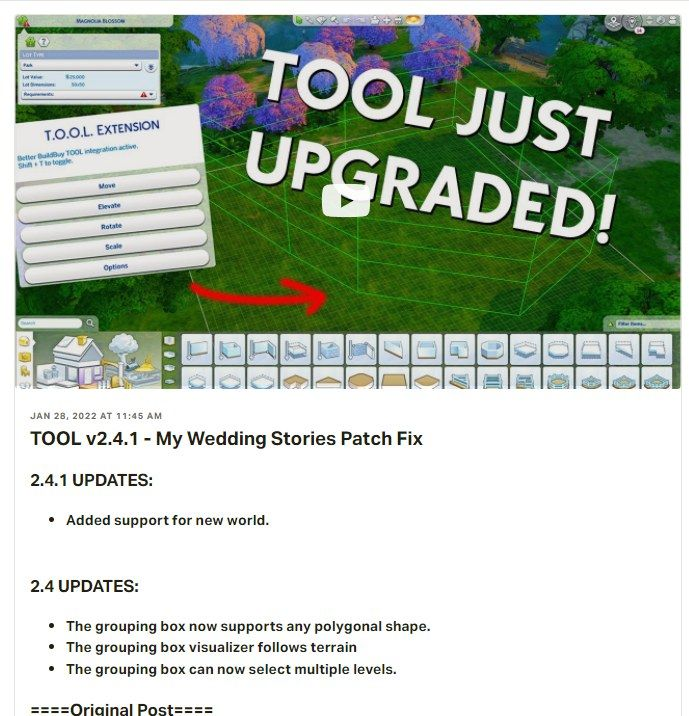
⚠️Note if you use the TOOL mod, there was an update for it to be compatible with the new world without the update you can’t see the new word. ⚠️
Issues and Some Work Arounds:

I will try to link to individual EA AHQ reports, but here’s a link to the general bug section for Sims 4: https://answers.ea.com/t5/Bug-Reports/bd-p/The-Sims-4-Bugs

Sims can’t get married with an officiant: If your sims can’t get married if they try to use an officiant, the action will hang. Cancel/reset your sims and choose either say vows or say vows and kiss. Do not choose an option with an officiant. I recommend not asking anyone to be an officiant at all, I noticed that my sim of honour, etc. didn’t stick when I asked a sim to be an officiant. I think this may be the EA AHQ report for this issue: https://answers.ea.com/t5/Bug-Reports/MWS-No-way-to-activate-the-officiant/m-p/11316525#M208162

Wedding cakes will spoil, even if they are put in the fridge. See mods (one by Ravasheen & in Bienchen’s mod batch) linked in the mod area that can help with that. Alternatively, if a sim with the ‘fresh chef’ trait makes the cake, it will never spoil. You get this trait by completing the chef aspiration, or you can use the cheat ‘traits.equip_trait Trait_FreshChef’ to add it to one of your sims, just make sure cheats are on (‘testingcheats on’ or ‘testingcheats true’, don’t include the quotes for any of the cheats noted here).

Cut the cake doesn’t work, unless you place it in the middle of a round dining table (thanks to Bienchen for that tip). Feeding cake to your spouse will also complete the tradition.

Guests don’t show up in wedding attire (this has a bug report on EA AHQ). Carl’s mod, linked below, can help with this or alternatively you can use Bienchen’s mod, also mentioned below (you need to choose one or the other as they conflict).

Only one sim can walk down the aisle, action will freeze if you try to get two sims to walk down together. I recommend only using one sim to walk down the aisle, or I have had luck sending two sims ‘up’ the aisle. Carl’s mod helps with this too.

Can’t walk down the aisle with a wedding bouquet. EA AHQ report. I just recommend not using a bouquet when you walk down an aisle, or if you can/do use mods, this is also fixed with Carl’s mod.

Issues with doing a toast: If you want to do a toast, have your sim request someone else to toast, this will complete the tradition.

Can’t toss bouquet: I have had success throwing the bouquet when you specify who is to catch it. If you are having problems, try resetting the sim who is doing the bouquet throw.

My Wedding Stories Laundry List:

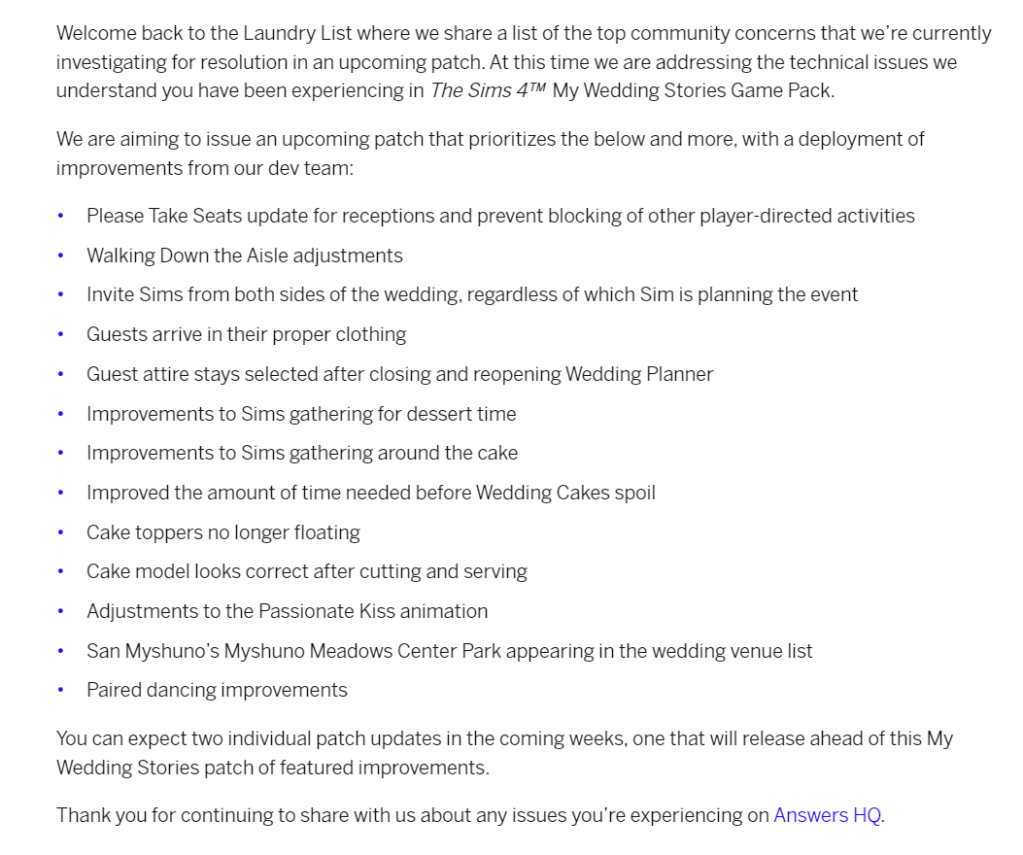
Note that EA released a My Wedding Stories Laundry List on March 3, 2022 which listed some of the things they are working on and hope to have in a game update soon, though this will follow an already planned update that will precede it. I expect the planned update will be for the release of the next unnamed Kit. See my video on that.
Mods to Help With My Wedding Stories:

Note choose which wedding fix mod you want to use as they will conflict with each other. So either use the Carl Sims wedding fix mod, Zero’s wedding fix mod, or the appropriate Bienchen mods.

Carl Sims Wedding Fix Mod:

Carl Sims has released a new version of his mod that adds base game weddings pack if you have the pack, among other things. Here’s the link if you use mods (you need both files and script mods need to be enabled, the latest version was released Feb 28). Just place these mods directly in your mods folder, they do not need to be unzipped. https://www.patreon.com/posts/wedding-stories-62954976

Screenshot with details on what Carl’s mod fixes (the final version has all the fixes in the prior versions).
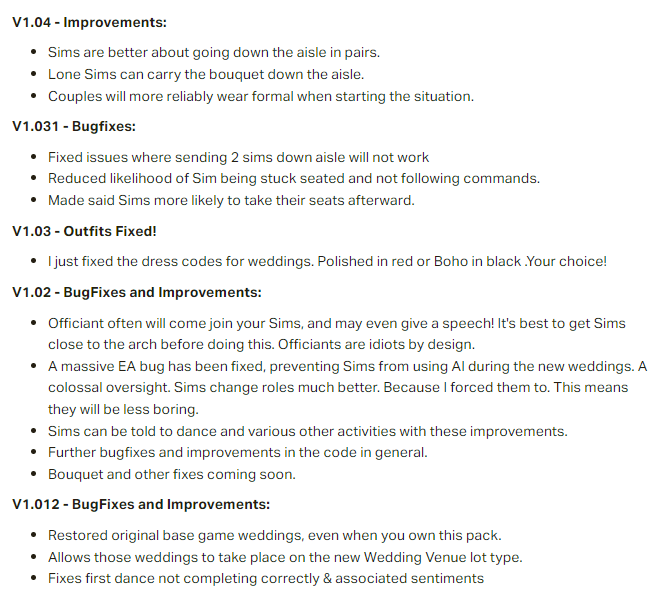
Details on what Carl’s mod fixes (the final version has all the fixes in the prior versions)

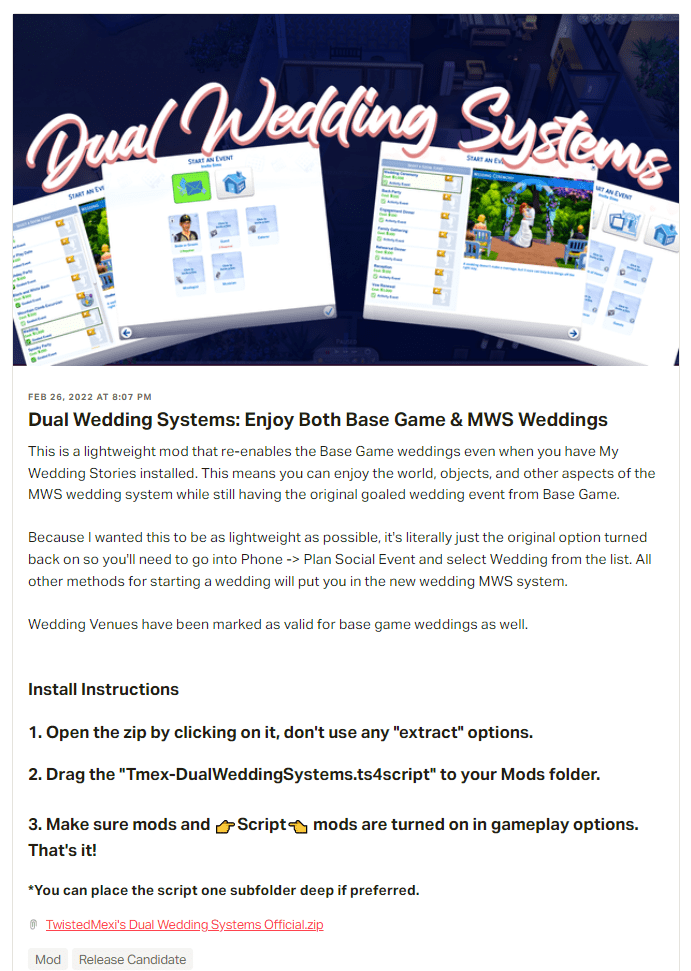
TwistedMexis Dual Wedding Systems Mod:

If you just want to add base game weddings back, TwistedMexis has what he calls a ‘light weight mod’ that let’s you do that. Now available to the public. https://www.patreon.com/posts/63098728
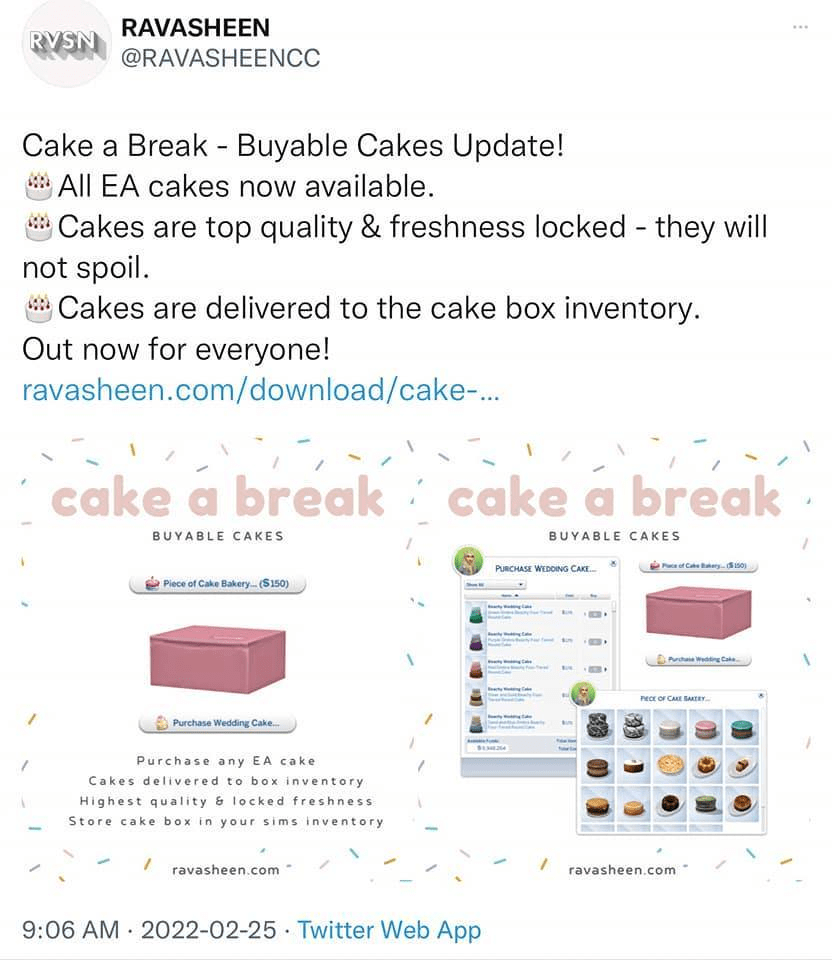
Ravasheen Cake a Break Mod:

Ravasheen has a mod for cakes, you can buy all cakes (for packs you have), they will be excellent and never spoil. https://ravasheen.com/download/cake-a-break-buyable-cakes/
Bienchen Batch Mods that Includes Mods that Help with MWS:

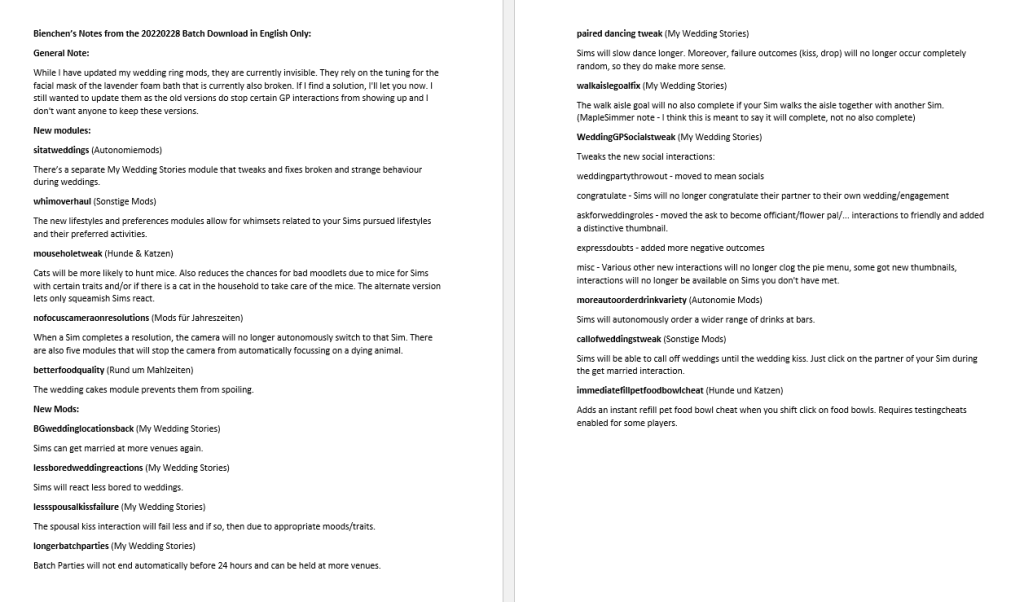
Bienchen has released some mods to help with My Wedding Stories issues – available as a batch download. The batch download also has a notes file to explain what is there. I took all the english notes and compiled them into a document, which I’ve also included a screenshot of below, along with notes from Bienchen from the forums post. There are a number that tweak or fix issues with the pack, you just need to choose the ones you want. They are all zipped so you need to unzip the ones you want. https://simfileshare.net/download/2993490/

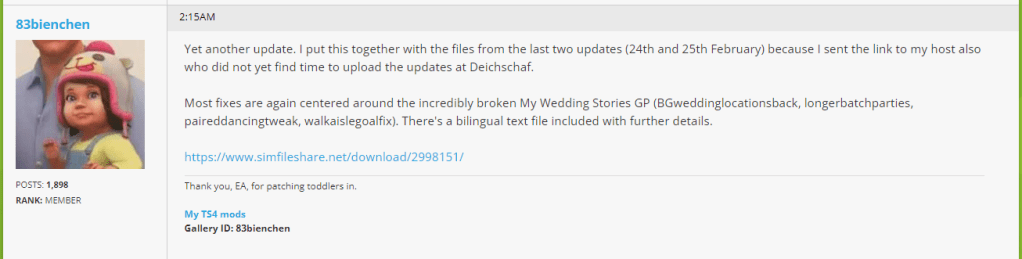
English Only Version of Bienchen notes for 20220228 Batch Download

Alternatively, these mods are all now located at Bienchen’s site, so you can pick and choose which mods you want to download. At a glance, I’ve found them either under My Wedding Stories category: https://deichschafblog.de/bienchen/hochzeitsgeschichten-my-wedding-stories/ with some more under her Miscellaneous Mods category: https://deichschafblog.de/bienchen/sonstige-mods-misc-mods/
and the food related ones under her Food category (wedding cake fix under :
https://deichschafblog.de/bienchen/rund-um-mahlzeiten-food-related/

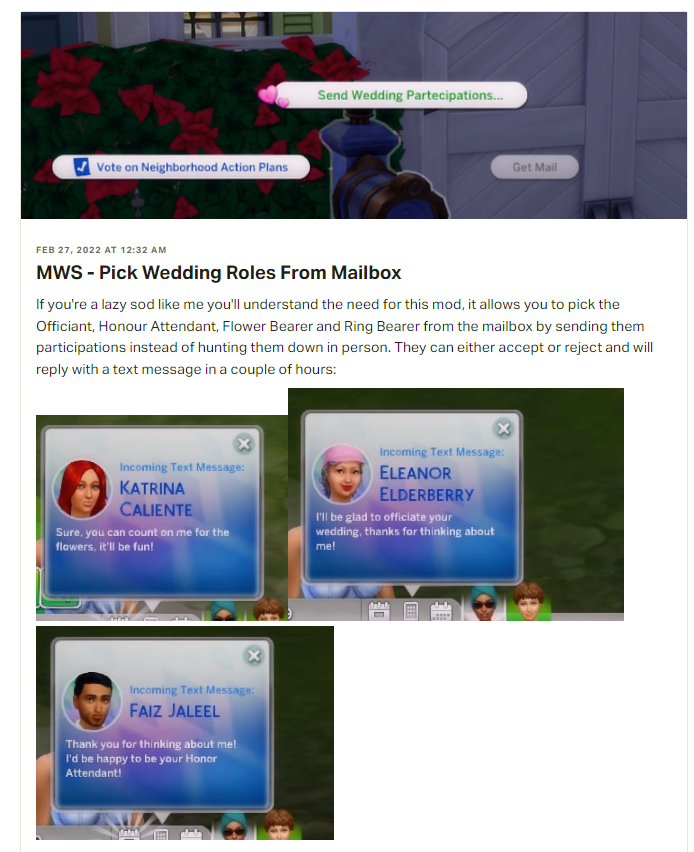
Zero’s MWS Mods:

This first mod by Zero lets you use the mailbox to ask sims to fill roles in your wedding. https://www.patreon.com/posts/mws-pick-wedding-63105314
This second link has mods by Zero that help with MWS wedding issues, though it seems to me that some/all of these issues are fixed by Carl’s mods and as I mentioned at the beginning of this section the mods that fix the wedding bugs will quite likely conflict.
https://www.patreon.com/posts/my-wedding-fixes-63037455
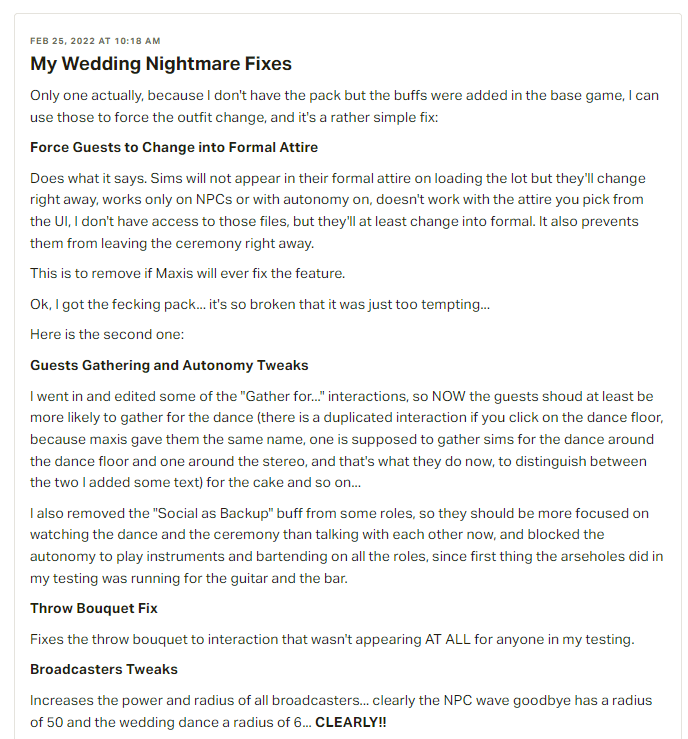
Mod Description by Zero

Chipped Sims Wedding Tweaks Mods:

Wedding tweaks and pets as flower pals:
Original: https://chippedcupanddustybooks.tumblr.com/post/677558371017162752/wedding-tweaks-pets-as-flower-pals-new

Updated, now lets you use small dogs: https://chippedscreationcorner.tumblr.com/post/677985837527580672/wedding-tweaks-pets-as-flower-pals-update
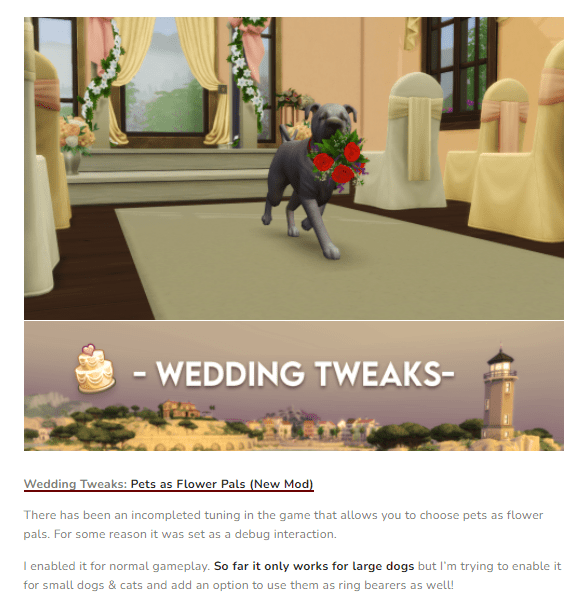
Extended Tartosa vendor hours: https://chippedscreationcorner.jimdofree.com/projects/gameplay-tweaks/wedding-tweaks/

Gameplay Improvements by MissyHissy:

Let’s you hold base game weddings at wedding venues (this is for base game, not MWS): https://www.patreon.com/posts/say-i-do-in-62680424

Lets you throw engagement and rehearsal dinners at restaurants, but there’s a limit of 8 sims who can be seated together (Dine Out limitation): https://www.patreon.com/posts/wedding-dinners-62988140

I hope you found this post helpful! If you have any questions or want to share your own Sims game play with other Simmers head over to my Facebook group, https://www.facebook.com/groups/maplesimmersimssanctuary or my discord, https://discord.gg/aJaX7Pca8A

#MyWeddingStories #GameBugs #MyWeddingStoriesIssues
Issues with Anti Virus Software & Sims 4

Sometimes your anti virus software can cause various issues with Sims 4. Please note that this isn’t a new issue and seems to happen randomly. ✅

⚠️ One of the main issues commonly seen when this happens is that mods and custom content don’t stay enabled after an update. ⚠️

However, your anti virus can cause other problems including, but not limited to:

  1. seeing red x’s in the gallery,
  2. being told you need to use the Legacy Version when you don’t,
  3. screenshots not saving to your screenshot folder.

✅Re the anti virus (which can include Windows Defender) blocking Origin/TS4 (and now the EA app) from updating the file, try adding both Origin and TS4 (and the EA app) as trusted applications. For more information on how to do this, see Crinrict’s blog post about it: https://crinrict.com/blog/2020/10/add-exceptions-to-anti-virus-programs.html

Here’s a link to the bug report on EA AHQ about it: https://answers.ea.com/t5/Technical-Issues-PC/CURRENT-ISSUE-Anti-Virus-blocking-User-Folder-Screenshots/td-p/9572695

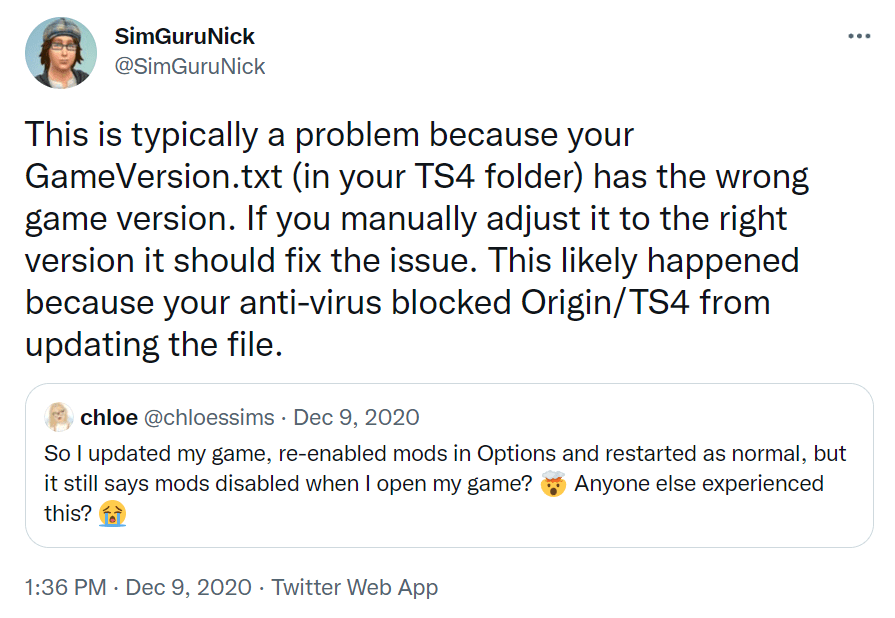
SimGuruNick had a suggestion after the December 2020 update which may help if the problem is caused by your anti-virus. The suggestion is to manually adjust your GameVersion.txt (in your TS4 folder, found under Documents\Electronic Arts) to the correct version.

Link to SimGuruNick’s tweet: https://twitter.com/SimGuruNick/status/1336741474105315328

As of the Nov 2/21 update, the current version for PC: 1.81.72.1030 . While I don’t believe this is an issue for Mac, their current version is: 1.81.72.1230

If you have any questions, need troubleshooting help or want to share your own Sims game play with other Simmers please head over to my Facebook group, Sims Sanctuary or my Discord

Oct 6, 2020 Game Update Overview & Issues (The Sims 4)

Video Link

Time stamp of what’s covered in the video:

1) Issue with Enabling Mods after update  
2) Update – What’s New:
     i)  Object & Food Overview
     ii) CAS Overview
3) Skin tones not fixed
4) Updated hairstyles (2)
5) Bug fixes
6) Mod Issues
7) Common Bugs not Fixed

Note new items will not show as new as they were added to base game. I show them in the video (see above links) but they can be easier to find if you filter by base game only (both for build/buy and create a sim).

Links referred to in the video:

Patch notes:

Sims Forums: https://forums.thesims.com/en_US/discussion/982109/october-6th-2020-patch-notes#latest

EA: https://www.ea.com/games/the-sims/the-sims-4/news/update-notes-oct-06-2020

Links for Issues with Enabling Mods:

Crinrict tweets:
Re: Options.ini: https://twitter.com/crinrict/status/1313816978549813249
Re: Avast: https://twitter.com/crinrict/status/1313909761725935616
Re: Default.ini: https://twitter.com/crinrict/status/1313910179579166720

How to do a factory reset (Crinrict blog):
https://sims4.crinrict.com/eng/2014/09/resetting-the-game-to-factory-settings-without-reinstalling/

Forum Post re Updated/Outdated Mods:

https://forums.thesims.com/en_US/discussion/980785/broken-updated-mods-cc-sw-jb-sept-oct-2020/p1

Work around for broken custom content windows/door: https://softpine.tumblr.com/post/628472141284786176/how-to-temporarily-fix-cc-windows-find-a-base

Skin Tones Still Being Blotchy:

SimGuruFrost tweet acknowledging they are also still seeing the Skin Tone issues:
https://twitter.com/SimGuruFrost/status/1313921930185981952

EA AHQ Links for Common Bugs:

If you are experiencing any of these issues, head over and add a ‘Me Too’!

Existing Issues Not Yet Fixed:

1) Freelancer Career: gigs not completing:
https://answers.ea.com/t5/Bug-Reports/OPEN-Freelancer-All-task-done-Gig-not-completed/m-p/8249033#M106373
Mod to fix this: https://louisim-yt.tumblr.com/post/628437862619201536/this-is-a-mod-that-fixes-the-freelancer-career-in

2) Games (chess, cards, etc) not finishing:
https://answers.ea.com/t5/Bug-Reports/OPEN-JTB-GT-Several-games-go-on-forever-chess-llama-sabacc/td-p/9471630

3) Gardening issues (plants look like harvestables/turning to dirt piles):
https://answers.ea.com/t5/Bug-Reports/OPEN-Plants-shrink-after-harvesting-Turns-into-harvestable/m-p/9187001#M136476

4) Kids not consistently learning adult skills:
https://answers.ea.com/t5/Bug-Reports/OPEN-Children-don-t-gain-adult-skills/td-p/9173470

5) Nanocans not paying when player puts the garbage in:
https://answers.ea.com/t5/Bug-Reports/OPEN-Nanocan-not-giving-simoleans/m-p/9167567#M132706

6) Issues with some Get Together doors/windows:
https://answers.ea.com/t5/Bug-Reports/OPEN-GT-King-of-Diamonds-Door-Stone-Frame-Holey-Geometry/td-p/9467717

New Issues:

1) New issue with new foods being normal:
https://answers.ea.com/t5/Bug-Reports/NEEDS-INPUT-Latin-cuisine-grill-foods-always-come-out-normal/m-p/9565371#M158140

N.A.P. Issues with Sims 4 Eco Lifestyle

Eco Lifestyle N.A.P. Issues

Do you have Eco Lifestyle? Are you finding things are going missing? Are NPCs constantly doing things like playing with future cubes, drawing tablets and baking cakes, among other things? This is probably caused by Neighborhood Action Plans (also known as N.A.P.s) that are currently in place. The July 23 game update was supposed to have fixed the issue of N.A.P.s enacted in other neighborhoods impacting your active neighborhood. Here are some suggestions that may help, including links to a couple of mods by Simvasion. 😊

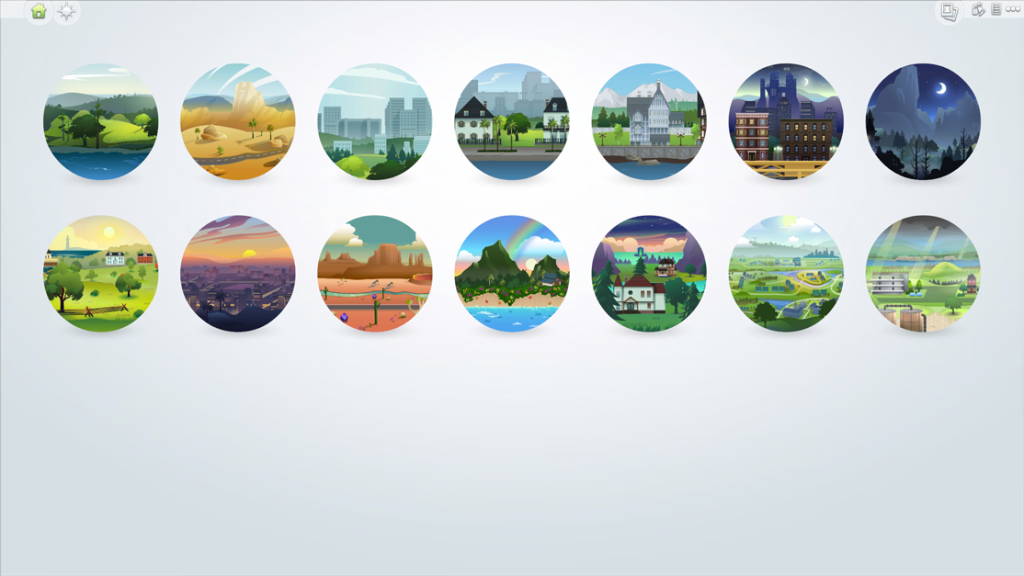
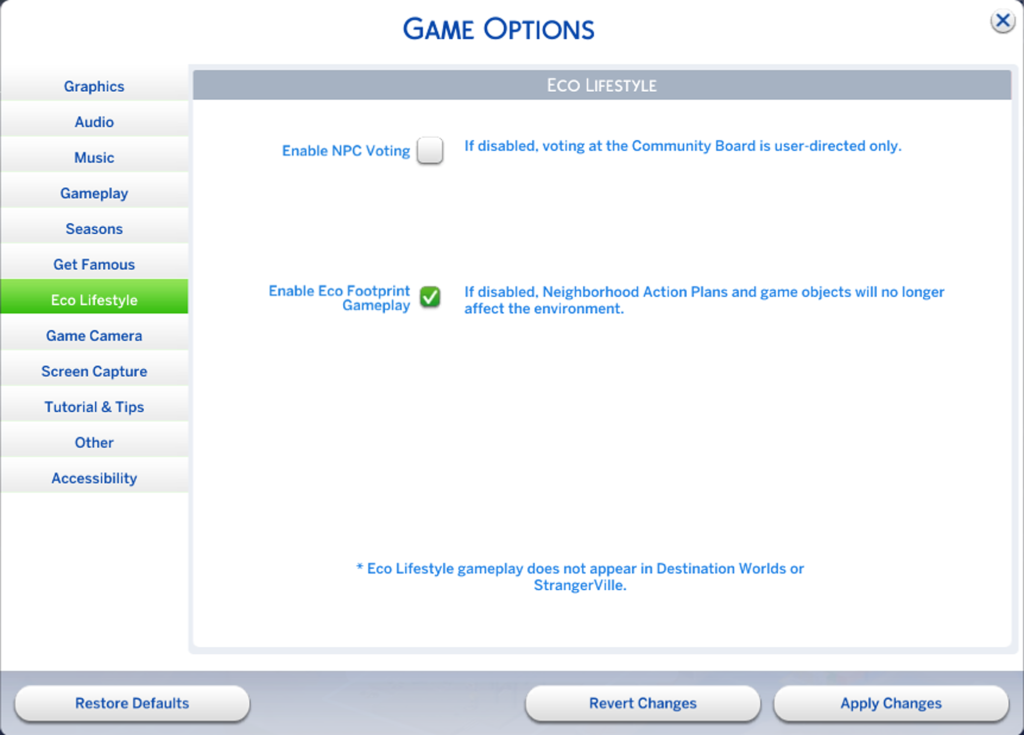
I try to avoid it by turning off NPC voting in game options before I start playing in a save; I would recommend doing this from the world selection menu because I’ve heard of some people having issues with the game crashing after they made the change if they don’t, though not everyone does, so you may be fine if you go in from your neighbourhood menu or from your household.

Here’s what I mean by the world menu.

From there go into game options and select the Eco Lifestyle tab and uncheck the ‘Enable NPC Voting’ option.

Along with not enabling NPC voting, the NAPs I have found to cause no issues are as follows:

  1. Clean Energy Production: Just make sure to add a dew collector & solar panel or windmill (I usually add at least one of all three and have had no problems passing the inspection).
  2. Green Gardening: I’ve heard to pass this one you need to make sure you have bugs (ie the Mitey Mitey Home Insect farm, or bees if you have Seasons) and that the inspector doesn’t look at the size of your garden. I usually have both and have passed this inspection.
  3. Self-Sufficiency: If your sims have a garden and NPCs have access to it, the NPCs will harvest your garden if you’ve not already done so and you lose the harvestables, however if you fence your garden or lot and lock the gate to the area, this NAP also causes no real issues.
  4. The two initiatives that are unique to Green Harbor, Green Initiatives and Modern Development (all three neighbourhoods in Green Harbor have these two options) have not caused me any problems either.

However, if you’ve already started playing in a save and the N.A.P.s are already in place, you can try repealing the N.A.P.s (either using the game play mechanics of getting 5 signatures to support the repeal or by using cheats). If you plan on using the in game mechanics to repeal a N.A.P., you can only do one repeal per voting period and it’s only available while the voting is open (ie 8 am Friday to 6 pm Monday). The use of cheats has the advantage in that you can repeal N.A.P.s at any time and as many as you want.

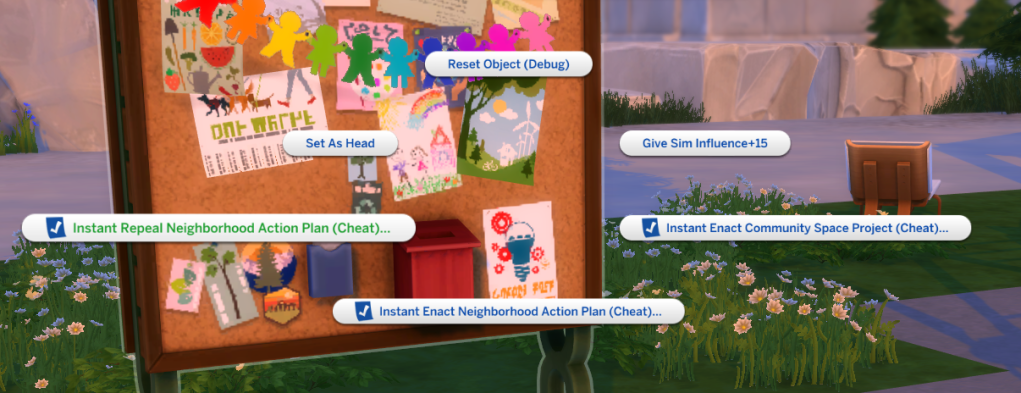
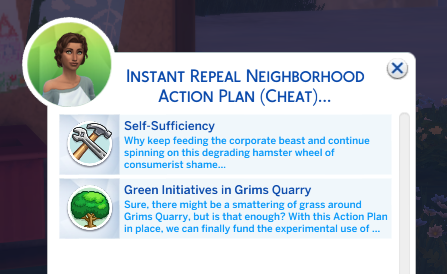
To use cheats, you need them on (to turn them on type ‘testingcheats on’ or ‘testingcheats true’ in the cheats console). Once they are on, shift click on a mailbox or community board and select ‘instant repeal Neighborhood Action Plan (Cheat)’.

Then select the one you want to repeal. If you want to repeal more than one, just do this again until all the N.A.P.s you want removed have been (there can only be up to four at one time 😊).

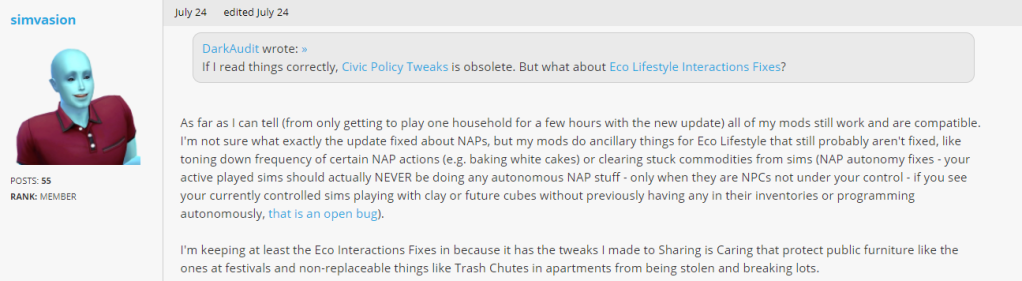
Unfortunately my understanding is that sometimes the actions will persist even after they’ve been repealed, if so you can try a couple of mods by Simvasion that should help. They should also help if you want to leave the N.A.P.s in place but have them be less intrusive, for example have them remain in the neighborhoods they originated in. 😊

Here are the links for Simvasion’s mod (it was previously two mods, but they’ve now been consolidated into one), which has been confirmed to still work and be needed after the July 23, 2020 game update:

Eco Lifestyle Interactions Fixes:
https://simvasion.com/eco-lifestyle-interactions-fixes/

https://forums.thesims.com/en_US/discussion/979020/broken-updated-mods-cc-july-2020-nifty-knitting-patch/p4

The issue of NAPs in other neighborhoods affecting NPC behaviour outside that neighborhood was supposed to be fixed with the pre Nifty Knitting game update of July 23, 2020, however other issues remain.

EA AHQ Links:

Here are the links to the EA AHQ reports on these issues if you want to add a ‘Me Too’. 😊

Items disappearing from lots:
https://answers.ea.com/t5/Bug-Reports/OPEN-ECO-Objects-disappear-from-lots-NPC-Stealing-with-and/m-p/9178834#M134874

Other threads related to the same N.A.P issue:
Future Cubes/Clay Spawning in Inventories:
https://answers.ea.com/t5/Bug-Reports/OPEN-ECO-Future-Cubes-Clay-Spawning-in-Inventories/td-p/9180759
Objects disappear from lots/ NPC Stealing (with and without N.A.P):
https://answers.ea.com/t5/Bug-Reports/OPEN-ECO-Objects-disappear-from-lots-NPC-Stealing-with-and/td-p/9178299
Random Romance Interactions w/wo active NAP:
https://answers.ea.com/t5/Bug-Reports/OPEN-ECO-Random-Romance-Interactions-w-wo-active-NAP/td-p/9180001
Obsessive cooking and baking by sims:
https://answers.ea.com/t5/Bug-Reports/OPEN-Sims-are-obsessed-with-cooking-and-baking/m-p/9187007#M138704

There is also another issue that causes objects to be swiped. This is your OWN Sim swiping his OWN own household objects (Recycle Trait):
https://answers.ea.com/t5/Bug-Reports/OPEN-ECO-Sim-swiping-own-household-objects-Recycle-Trait/td-p/9175363